
Let us get you 3 quotes
Compare and select the best Connectivity & Network Device
Compare Quotes

Find the right
Connectivity & Network Device in Hobart
Connectivity & Network Device in Hobart
Join medical buyers comparing supplier quotes and buying with confidence. Free, quick and easy.
How MedicalSearch works
Tell us what you need
Answer a few quick questions about the equipment you're looking for.
Get personalised quotes
Receive tailored quotes from relevant Australian suppliers.
Compare and choose
Compare quotes, ask questions and choose the best option for you.
Looking to buy the best Connectivity & Network Device for sale in Hobart? Get Quotes sends your requirements to expert suppliers in Australia so you get personalised quotes to compare Connectivity & Network Device prices, specifications, features and terms then choose the one that’s right for you. Also compare servicing, consumables and reviews, so you can buy with confidence.
 Save time
 Compare quotes
 Buy with confidence
Save time, compare quotes & buy with confidence
Connectivity & Network Device Suppliers in Hobart
Updated Jan 12, 2023
Supplier Location
Brand
Filter by brand:
Filter by location:

Trucell | Medical Displays
Trucell is an Connectivity & Network Device supplier to All
Trucell provides I.T. related services to Business and Medical facilities; the services range from consulting to installation and maintenance. Partnered with the leading hardware and software manufacturers, Trucell offers the latest in Networking, Security, and Computer equipment. Our highly skilled staff offer customised solutions and consulting services that meet your needs ...

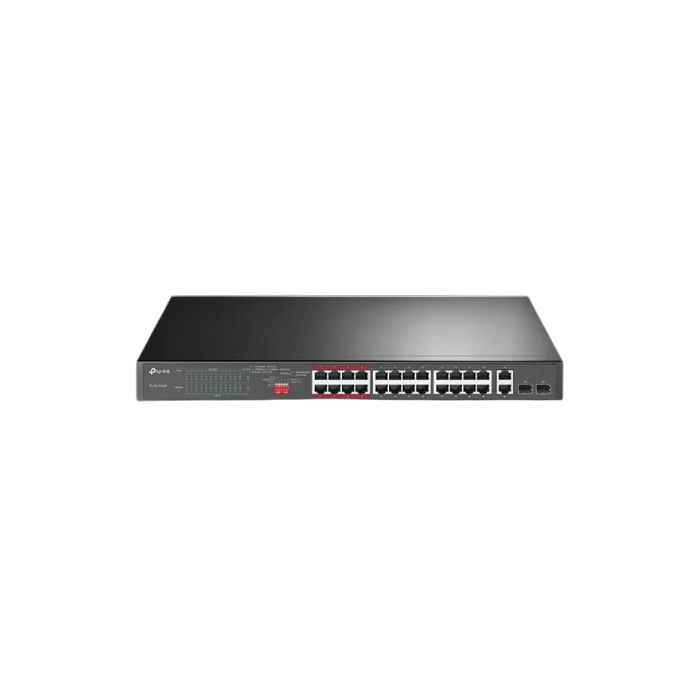
Connectivity & Network Device
Connectivity & Network Device
What type of connectivity and network device do I need for my home or office?
The type of connectivity and network device you need for your home or office depends on your specific needs. For basic internet connectivity, a modem and router are typically required. If you have multiple devices and need to connect them to the internet, a switch or hub may also be necessary. For larger offices or businesses, a network server and firewall may be needed to manage and secure the network. Additionally, the type of connectivity you choose will depend on your location and available options, such as cable, DSL, fiber, or satellite internet.
What is the difference between a router and a modem?
A router is a device that connects multiple devices to a network and manages the traffic between them. It allows devices to communicate with each other and access the internet. A modem, on the other hand, is a device that connects a computer or router to the internet service provider (ISP). It converts the digital signals from the router into analog signals that can be transmitted over a phone line, cable, or fiber optic line. In short, a modem connects a device to the internet, while a router manages the traffic between devices on a network.
Can I use a wireless router if I don't have a wired internet connection?
No, a wireless router requires an internet connection to function. If you don't have a wired internet connection, you can use a mobile hotspot or a satellite internet connection to connect to the internet and then use a wireless router to create a Wi-Fi network.
How many devices can I connect to a router?
The number of devices that can be connected to a router depends on the type and specifications of the router. Generally, most routers can support up to 250 devices, but this number can vary depending on the router's capabilities and the bandwidth requirements of each device. It is important to check the specifications of your router to determine the maximum number of devices it can support.
What is the range of a wireless router?
The range of a wireless router varies depending on factors such as the type of router, the frequency band it uses, the obstacles in the environment, and the power output. Generally, most routers have a range of up to 100-150 feet indoors and up to 300-500 feet outdoors. However, some high-end routers can have a range of up to 1000 feet or more. It is important to note that the actual range may be affected by interference from other wireless devices and the quality of the router's antennas.
How do I set up a wireless network?
To set up a wireless network, follow these steps:
- Choose a wireless router: Select a router that fits your needs and budget.
- Connect the router to the modem: Connect the router to the modem using an Ethernet cable.
- Power on the router and modem: Plug in the router and modem and turn them on.
- Access the router's settings: Open a web browser and enter the router's IP address to access its settings.
- Configure the router: Follow the router's setup wizard to configure the network name (SSID), password, and security settings.
- Connect devices to the network: Connect your devices to the network by selecting the network name and entering the password.
- Test the network: Test the network by browsing the internet and checking the signal strength and speed.
- Secure the network: Enable WPA2 encryption and change the default login credentials to secure the network.
What security features should I look for in a router?
WPA3 encryption: This is the latest and most secure form of Wi-Fi encryption that protects your network from unauthorized access.
- Firewall: A firewall helps to block unauthorized access to your network and prevent hackers from accessing your devices.
- VPN support: A router that supports VPN (Virtual Private Network) allows you to encrypt your internet traffic and protect your online privacy.
- Guest network: A guest network allows you to create a separate network for guests, which keeps your main network secure.
- Parental controls: Parental controls allow you to restrict access to certain websites and content, which is especially important if you have children in the house.
- Automatic firmware updates: Regular firmware updates ensure that your router is protected against the latest security threats.
- MAC address filtering: MAC address filtering allows you to restrict access to your network based on the MAC address of the device.
- Disable WPS: WPS (Wi-Fi Protected Setup) is a feature that allows you to connect devices to your network quickly and easily. However, it is also a security vulnerability and should be disabled.
Can I use a router with my existing internet service provider?
Yes, you can use a router with your existing internet service provider. In fact, most internet service providers recommend using a router to connect multiple devices to the internet and to improve the overall performance of your network. You can either purchase a router from your ISP or buy one from a third-party retailer. However, you should check with your ISP to ensure that the router is compatible with their network and to get any necessary configuration settings.
What is the average lifespan of a router?
The average lifespan of a router is around 3-5 years. However, this can vary depending on the quality of the router, how often it is used, and how well it is maintained. Some routers may last longer than 5 years, while others may need to be replaced sooner. It is important to keep the router updated with the latest firmware and to regularly clean and dust it to ensure optimal performance and longevity.
What is the cost of a good quality router?
The cost of a good quality router can vary depending on the brand, features, and specifications. Generally, a good quality router can cost anywhere from $50 to $300 or more. It is important to consider your specific needs and budget when choosing a router.
Get 3+ Quotes Now - Compare prices, availability and quality. It’s free, quick and secure.
Back to top
Connectivity & Network Device Costs and Supplier Insights
The listed price of a Connectivity & Network Device for sale ranges from $50 to $2,000, averaging $1,025.
If you are looking to buy a Connectivity & Network Device for sale, suppliers on MedicalSearch include Trucell
Use Get Quotes to receive personalised prices and proposals from trusted suppliers with top reviews and excellent service.
Buy a Connectivity & Network Device Near Me
Save time and delivery costs while getting fast support, by contacting Connectivity & Network Device suppliers near you.
Connectivity & Network Device for sale in Sydney
Connectivity & Network Device for sale in Melbourne
Connectivity & Network Device for sale in Perth
Connectivity & Network Device for sale in Hobart
Connectivity & Network Device for sale in Brisbane
Connectivity & Network Device for sale in Adelaide
Connectivity & Network Device for sale in Darwin
Connectivity & Network Device for sale in Melbourne
Connectivity & Network Device for sale in Perth
Connectivity & Network Device for sale in Hobart
Connectivity & Network Device for sale in Brisbane
Connectivity & Network Device for sale in Adelaide
Connectivity & Network Device for sale in Darwin

Are you a Connectivity & Network Device supplier?
 Reach valuable medical buyers in minutes
 Promote key products & content
 Drive cost effective & measurable sales
learn more
Reach valuable medical buyers in minutes
Promote key products & content
Drive cost effective & measurable sales